Frequently Asked Questions
Here are some of the questions we are frequently asked. If you have a question not listed here or you would like further explanation please contact us.
Below are a list of the most common ‘How To’ questions.
For BBX Members
The short answer is no. However in the following circumstances cash may make up part of the transaction.
- If the buyer has insufficient BBX in their account – the BBX platform will inform you of this.
- Real Estate Purchases. Firstly because the buyer may not have sufficient funds and secondly the vendor may have a mortgage to pay off.
- When the buyer wishes to purchase at a wholesale price to offset a fixed cost overhead or a core product. For example a wine merchant supplying a restaurant wine at a wholesale price. The wholesale price might be £3 at a cost of £2.50 (due to import duties and distribution) to the wine merchant. The wine merchant would not be able to absorb these costs month in and month out so a blend of cash and BBX is negotiated. Your BBX account manager can guide you through this.
- If the seller is required to sub-contract part of a supply to a non-BBX account holder (the seller will inform the purchaser of this upfront). Notwithstanding if the seller wishes to mark-up the sub-contractors goods or services, then it should be on full BBX . An example would be a mechanic who fixes an engine but has to sub-contract work to provide body damage repair and has to pay this person in cash.
- Sometimes it may be uneconomical for the seller to BBX the whole transaction. For instance a hotelier (buyer) may want his whole hotel redecorating which will take a painter & decorator (seller) 3 months to complete. This could preclude the painter & decorator from doing any cash work during this time. Again your BBX account manager can guide you through any specific circumstances.
For accounting and all other purposes one BBX credit equals one pound sterling. If a transaction is currently taxable then in all probability it will be taxable if transacted using the trading platform. Conversely if you currently purchase a good or service where you get a tax deduction this will continue to be so when you pay by BBX.We advise all account holders to consult a properly qualified accountant (there are many available on the platform).
The simple answer is whatever you would normally charge or quote without discounting! However if you wish to discount that is usually not expected but feel free to do so if the circumstances warrant. Ask yourself “If I was buying from me would I be happy and recommend myself to a friend?”.
There is no contract period or restrictions on closing. However if your account is in deficit you would be required to settle this amount by offering your products or services back into the network to settle the account. If your account is in credit you simply spend the credit down to zero by buying goods and services from fellow BBX account holders.
Fees are deducted via Direct Debit on or around the 9th of each month. If you don’t have Direct Debit in place you can set up a DD over the phone with your trade broker on 0333 400 2014. You can also make payment via:
- Credit card – please call your trade broker on 0333 400 2014.
- PayPal – https://www.paypal.me/bbxltd
- Bank Transfer: BBX Exchange Ltd, Sort code: 087199, Account: 12974844
Here is an explanation of ‘How To’ process BBX transactions, via the BBX trading portal – just follow the steps as detailed below.
You can also process BBX transactions, anytime, anywhere, via the BBX Merchant POS app – click here for details.
Step 1 – login
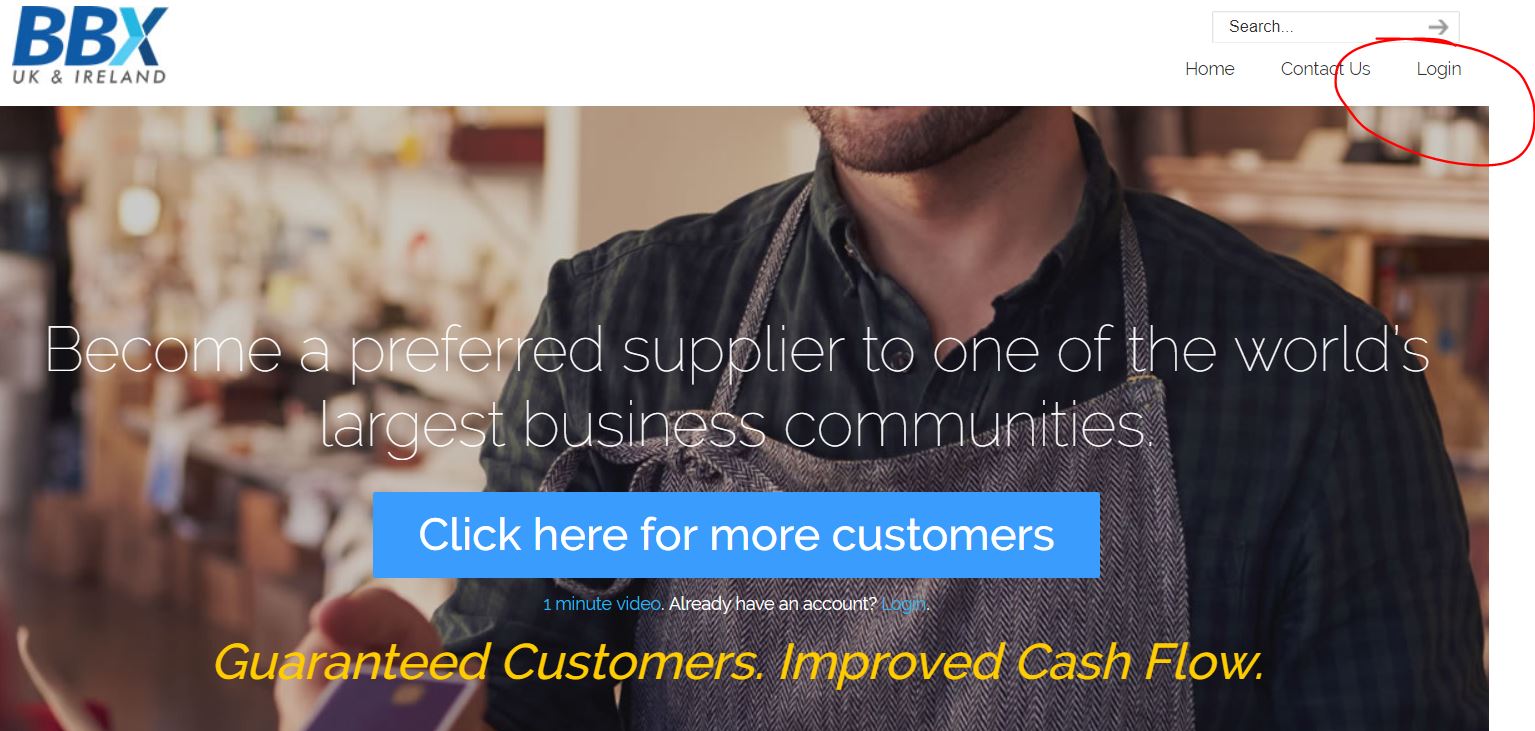
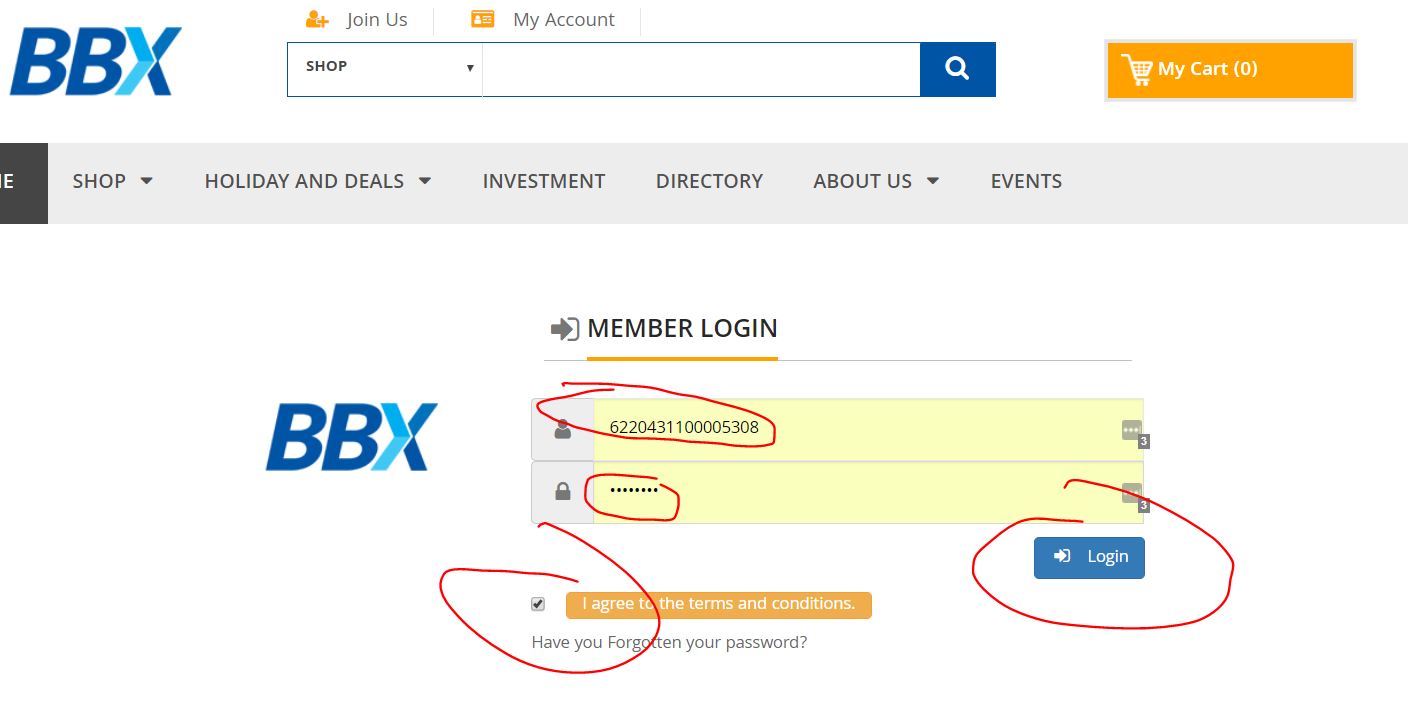
Step 2 – fill in your 16 digit account number and password
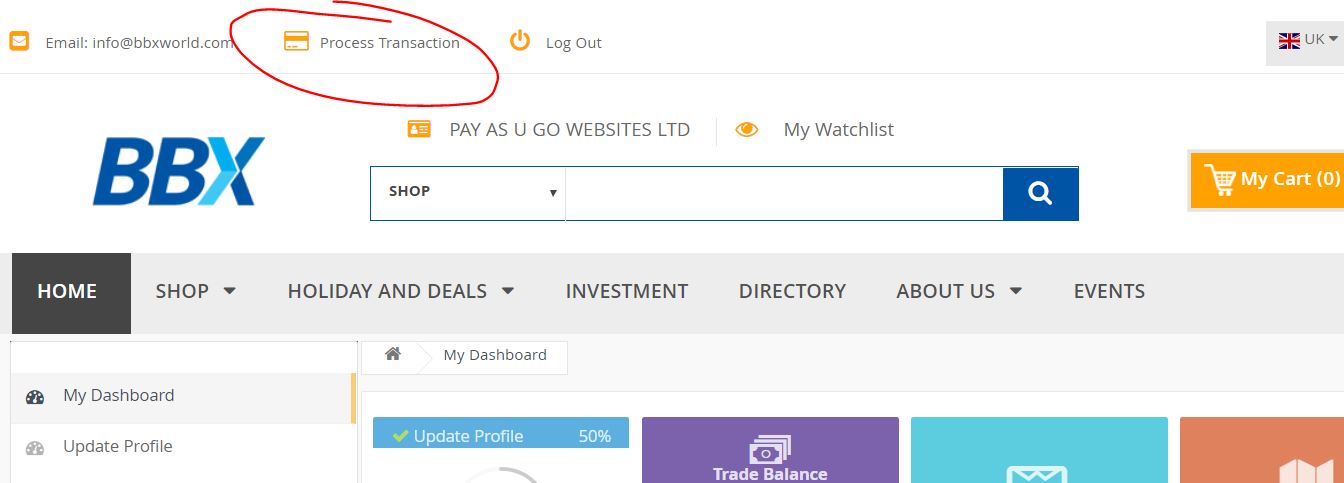
Step 3 – click on process transaction
Step 4 – follow the steps
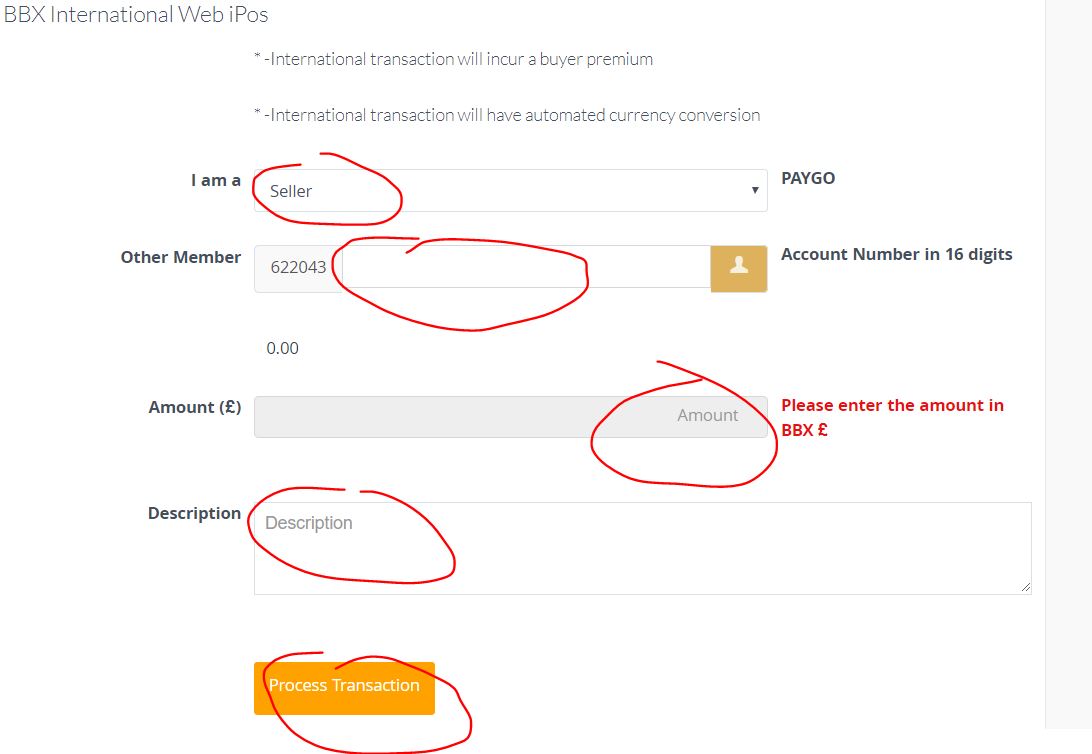
Simply enter:
- The BBX account number of your customer/supplier
- The amount of the transaction
- A description of what the transaction is for – i.e. Food & Drink (if you have raised an invoice for your customer for the transaction, it makes sense to enter the relevant invoice number)
Then click “Process Transaction”
The transaction should process immediately, and if successful will appear on your BBX statement.
If the transaction was not successful, contact your account manager.
BBX Accounts
Simply treat your BBX account as another account and include this on your accounting software and enter each transaction as a debit or credit accordingly.There are many accountants on the BBX platform that can help you with this.
The short answer is no. However in the following circumstances cash may make up part of the transaction.
- If the buyer has insufficient BBX in their account – the BBX platform will inform you of this.
- Real Estate Purchases. Firstly because the buyer may not have sufficient funds and secondly the vendor may have a mortgage to pay off.
- When the buyer wishes to purchase at a wholesale price to offset a fixed cost overhead or a core product. For example a wine merchant supplying a restaurant wine at a wholesale price. The wholesale price might be £3 at a cost of £2.50 (due to import duties and distribution) to the wine merchant. The wine merchant would not be able to absorb these costs month in and month out so a blend of cash and BBX is negotiated. Your BBX account manager can guide you through this.
- If the seller is required to sub-contract part of a supply to a non-BBX account holder (the seller will inform the purchaser of this upfront). Notwithstanding if the seller wishes to mark-up the sub-contractors goods or services, then it should be on full BBX . An example would be a mechanic who fixes an engine but has to sub-contract work to provide body damage repair and has to pay this person in cash.
- Sometimes it may be uneconomical for the seller to BBX the whole transaction. For instance a hotelier (buyer) may want his whole hotel redecorating which will take a painter & decorator (seller) 3 months to complete. This could preclude the painter & decorator from doing any cash work during this time. Again your BBX account manager can guide you through any specific circumstances.
For accounting and all other purposes one BBX credit equals one pound sterling. If a transaction is currently taxable then in all probability it will be taxable if transacted using the trading platform. Conversely if you currently purchase a good or service where you get a tax deduction this will continue to be so when you pay by BBX.We advise all account holders to consult a properly qualified accountant (there are many available on the platform).
The simple answer is whatever you would normally charge or quote without discounting! However if you wish to discount that is usually not expected but feel free to do so if the circumstances warrant. Ask yourself “If I was buying from me would I be happy and recommend myself to a friend?”.
The answer is no because when you spend BBX with a VAT registered account holder you will receive a tax invoice allowing you to claim the VAT back in cash! Therefore offsetting the VAT obligation you incurred on the sale.We advise all account holders to consult a properly qualified accountant (there are many available on the platform).
The DRF is put in place to protect the exchange and its account holders. Every account holder pays an annual card fee of £200 BBX and out of that payment £100 BBX is deposited into a dedicated DRF account. It is a fund which is ring fenced and only called upon to cover a bad debt left by an account holder. What this means is that if an account holder having borrowed BBX£ using their interest free credit line facility subsequently defaults and BBX have done all they can to recover the debt but have been unsuccessful then BBX will draw on the Debt Reserve Fund to make good the outstanding debt. This means that provided an authorization is obtained at the point of sale there are no bad debts or accounts receivable ! The DRF is NOT available for consumer dispute resolution.
There are a number of options:
- Online – www.ebbx.com and logging into your account.
- Smart Phone – BBX are about to release an app that will allow you to transact on the go.
- Account Manager – You can call the BBX office and authorise your account manager to transfer the funds.
There is no contract period or restrictions on closing. However if your account is in deficit you would be required to settle this amount by offering your products or services back into the network to settle the account. If your account is in credit you simply spend the credit down to zero by buying goods and services from fellow BBX account holders.
Here at BBX we like to be transparent about our fees, so please find below a full explanation of these – please keep this safe as a future reference point.1. BBX Account FeeThe account fee, goes from £0 up to £4,497 + VAT and determines the level of ‘sales success fees’ you pay and the amount of BBX credit that will be available to you. It will also determine whether or not you will have access to the raft of BBX Added Benefits (reserved for Silver, Gold and Black account holders), such as:
- A FREE Fuel Card
- A FREE Business Scene Membership
- Access to the BBX REWARDS scheme
Details of our account options can be seen here.
2. Annual Card Fee
This pays to keep your BBX account open for 12 months.
£200 + VAT Cash
T£100 + VAT BBX
Plus T£100 BBX Debt Reserve Fund – which has already come off your BBX account balance. The Debt Reserve Fund protects BBX clients from bad debt on the exchange. All BBX clients pay into this once a year and all systems like ours around the world have to have this in place. If you would like me to explain in detail how it works, please let me know.
3. Sales Success Fee
This is charged as a percentage of the value of any new sales, you receive, as a member of the BBX Community – this is charged at the point of any sales transaction taking place:
BRONZE – 15% + VAT in Cash
SILVER – 13% + VAT in Cash + 1% + VAT in BBX Pounds
GOLD – 10% + VAT in Cash + 1% + VAT in BBX Pounds
BLACK – 6.5% + VAT in Cash
That is it. There are no other charges on the account.
Fees are deducted via Direct Debit on or around the 9th of each month. If you don’t have Direct Debit in place you can set up a DD over the phone with your trade broker on 0333 400 2014. You can also make payment via:
- Credit card – please call your trade broker on 0333 400 2014.
- PayPal – https://www.paypal.me/bbxltd
- Bank Transfer: BBX Exchange Ltd, Sort code: 087199, Account: 12974844
You can access your BBX account and process BBX transactions, anytime, anywhere, using the BBX World App! If you don’t have the app please click here to find where you can download it.
Please find below a guide on how to access the BBX World App and process BBX transactions anytime, anywhere:
1. Go to your relevant app store and search for ‘BBX WORLD’ :
2. Download the App, and then use your BBX login details to access the app, this will be either your 16 digit account number or email. The password will be the same you use for logging into the online trading portal. If in doubt you can reset it by clicking here.
3. Once logged in click on ‘Pay BBX’ and follow instructions below: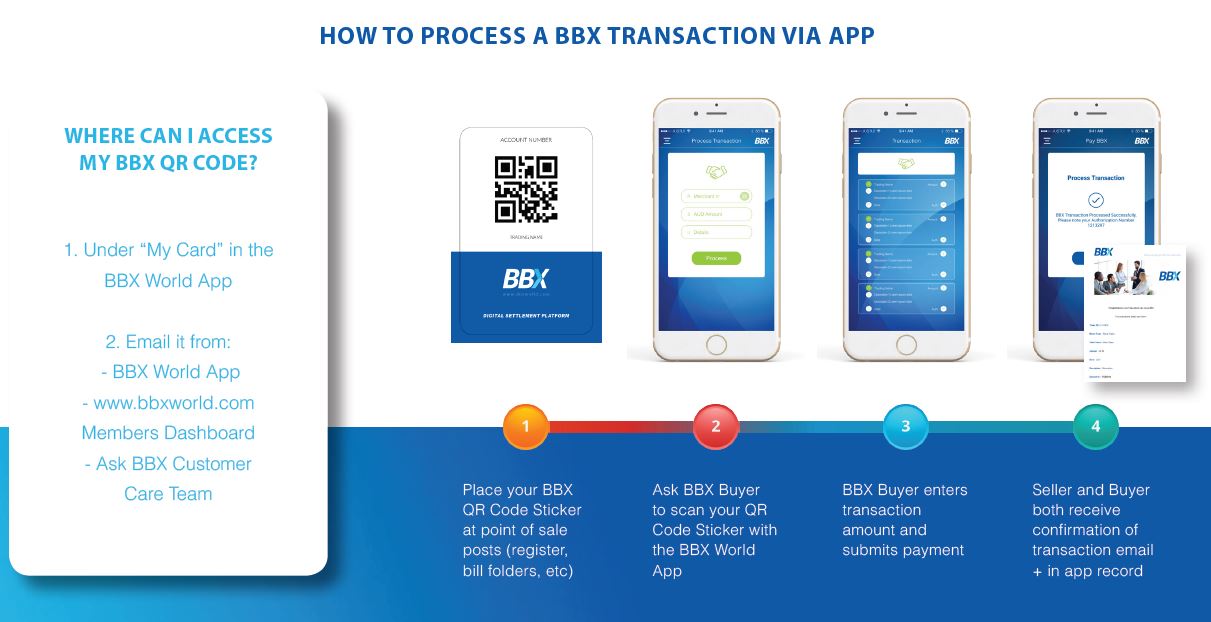
You can process BBX transactions, anytime, anywhere and on multiple devices using the BBX Merchant POS App! If you don’t have the app please click here to find where you can download it.
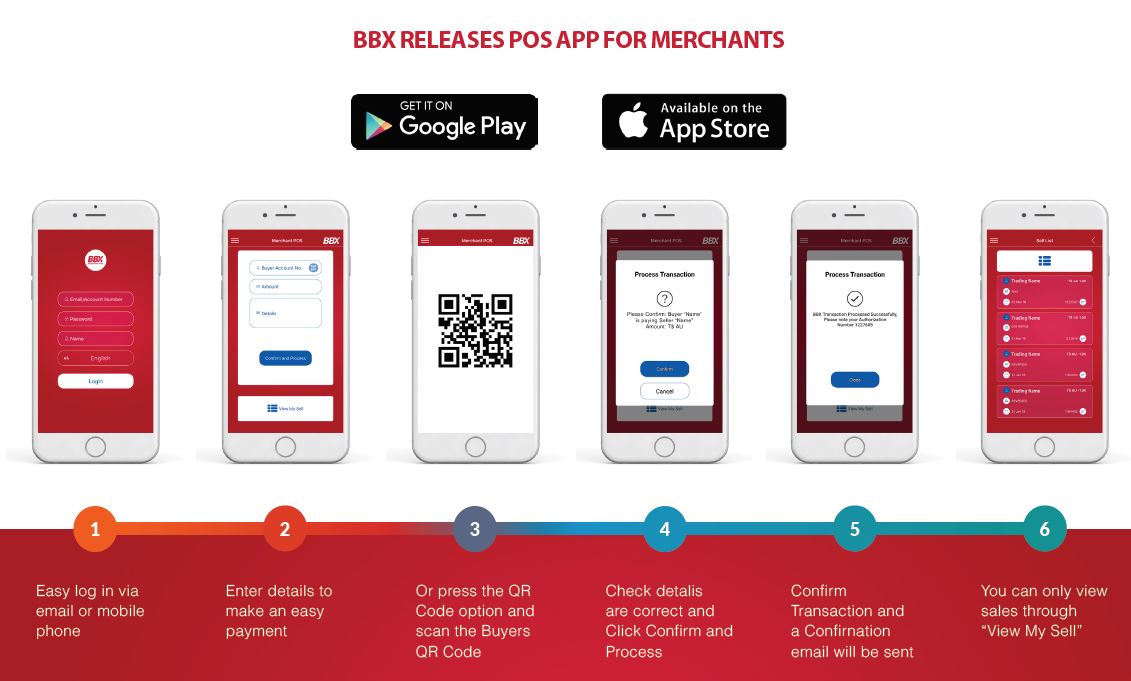
Please find below a guide on how to access the BBX Merchant POS App and process BBX transactions anytime, anywhere:
1. Go to your relevant app store and search for ‘BBX MERCHANT’ :
2. Download the App, and then use your BBX login details to access the app, this will be either your 16 digit account number or email. The password will be the same you use for logging into the online trading portal. If in doubt you can reset it by clicking here.
3. Once logged in follow the below steps:
Here is an explanation of ‘How To’ process BBX transactions, via the BBX trading portal – just follow the steps as detailed below.
You can also process BBX transactions, anytime, anywhere, via the BBX Merchant POS app – click here for details.
Step 1 – login
Step 2 – fill in your 16 digit account number and password
Step 3 – click on process transaction
Step 4 – follow the steps
Simply enter:
- The BBX account number of your customer/supplier
- The amount of the transaction
- A description of what the transaction is for – i.e. Food & Drink (if you have raised an invoice for your customer for the transaction, it makes sense to enter the relevant invoice number)
Then click “Process Transaction”
The transaction should process immediately, and if successful will appear on your BBX statement.
If the transaction was not successful, contact your account manager.
BBX Connect App
You can access your BBX account and process BBX transactions, anytime, anywhere, using the BBX World App! If you don’t have the app please click here to find where you can download it.
Please find below a guide on how to access the BBX World App and process BBX transactions anytime, anywhere:
1. Go to your relevant app store and search for ‘BBX WORLD’ :
2. Download the App, and then use your BBX login details to access the app, this will be either your 16 digit account number or email. The password will be the same you use for logging into the online trading portal. If in doubt you can reset it by clicking here.
3. Once logged in click on ‘Pay BBX’ and follow instructions below:


